Showing posts with label blogging. Show all posts

How to Embed Facebook Videos on Your Blog

0 comments

I really thought Facebook videos cannot be embedded on a blog, just because they don't give the embed codes on the video page. It's the reason why I never uploaded my videos on Facebook cuz I thought I wouldn't be able to put them on my blog. So I almost always use YouTube for video uploading. That way, I can put them on my blog and my Facebook wall as well.

But then I encountered a Facebook video a while ago that I wanted to embed on my blog. I searched YouTube for the said video but I couldn't find any.

It's then that I thought about searching Google for embedding Facebook videos on blogs, and I almost hit myself. The instructions are just waiting for me all along.

1. Go to the Facebook video page that you want to use
2. Find the video ID at the address bar like the one the arrow is pointing at in the picture below
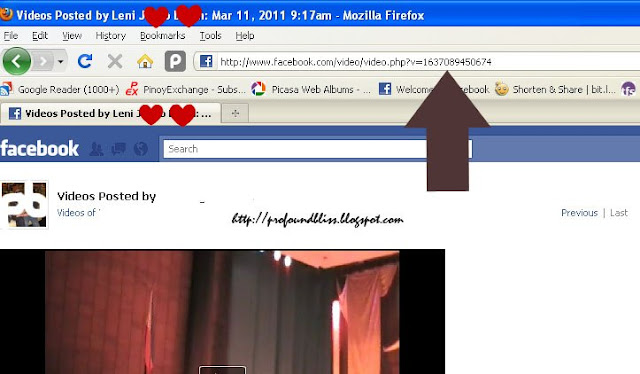
3. Use the code below to embed the video in your blog:

<object width="400" height="224" >
<param name="allowfullscreen" value="true" />
<param name="allowscriptaccess" value="always" />
<param name="movie" value="http://www.facebook.com/v/xxx" />
<embed src="http://www.facebook.com/v/xxx" type="application/x-shockwave-flash"
   allowscriptaccess="always" allowfullscreen="true" width="400" height="224">
</embed>
</object>

4. Replace "xxx" (there are two, in red fonts) with the video ID found at the address bar.

That's how simple it is to embed a Facebook video on your site or blog.

Had I known this a couple of months ago, it could have made my virtual life a lot easier.

via labnol.org

The Blogger Template Designer

0 comments

I'm so glad for Blogger's new feature - the Template Designer!

You can change the columns, bring it to the left or to the right or have them on either side of the template. You can change background images even if you don't know anything about HTML or CSS. You can even customize how the footer looks like!

I've been itching to try it out but can't do it on my netbook. I need a bigger LCD for that so I'll be on the pc a little later.

To give you a preview of what you can do to your blog's template, watch the vid below.

Chuvaness

0 comments

Omigad! I wasn't able to do anything the whole day!

Reason?

I was stuck at chuvaness.livejournal.com for her 6 millionth reader contest.

Amfness! More than 800 people were online and the closest I was able to get to 6,000,000 was 6,000,018! Sayang but the counter adds up so fast talaga.

I wanted to get the Flip. Para hindi na ako bumili. Pero oh well...

Declare

0 comments

FTC or Federal Trade Commission demands that bloggers declare if and when they receive cash or freebies for posts. LOL!

I don't think it's bad idea at all. LOL! Oh well perhaps I'm just laughing because a) I haven't made anything out of blogging yet; and b) I'm not in the US.

Need a sample? Click.

Ang Baha sa Third World

0 comments

If typhoon Ondoy didn't bring so much devastation to the country, I'm sure everyone would already be talking about Christmas. After all, it's less than three months away.

But instead of shopping for the holidays, as we always do as soon as the "ber-months" start, we now shop for either relief goods (for those who have money to share) or extra groceries for the pantry to prepare for the worse that could happen.

As far as I can remember before Ondoy reached us, news about electricity crisis was the thing that bothered me and my mom. Brownouts are so bad for the business it would really affect our family's income.

But our fears are now diverted to the flood. We now don't fear brownouts anymore. At least for now.

But with all that the people in the flooded area has lost, what's a little brownout a day for us, 'di ba?

I hope the flood will subside soon and that no more typhoon gives us flood anymore this year. Malapit na ang Pasko. Even if my heart melts to the thought of how those who have lost what they have in the flood could celebrate Christmas, I think a typhoon-less Christmas would already be a great gift to all of us in the Philippines.

Meanwhile, I can't help but get a little... mad... at one of the fashion bloggers I admire. You know, blogging away as if nothing bad is happening to the Philippines is okay if you're not a Filipino. But for a Filipino blogger to keep on blogging about fashion week without even a mention of care about the victims of Ondoy is... (for me) brutal.

I know that he's not so proud of the third world that he comes from. But please, show some care naman. Nakakakilabot basahin mga post mo. Okay lang sana if there's at least one post showing concern.

But then again, baka naman nag-donate na s'ya to the flood victims of the third world.

Sana.

Zoundry Raven

0 comments

I know I've used this program before but I didn't like it due to the wide spaces in between paragraphs. I knew there had to be an option somewhere that would make the spaces narrower but I was so lazy to look for it. And besides, Windows Live Writer is so easy to use.

But then I need a mobile one. Something I can store in a flash disk so I can use it wherever. I can't really install Windows Live Writer in every computer I would use. And even if I could, it's just so time consuming.

my old iPod Shuffle that I now use as flash diskZoundry Raven has this mobility feature for bloggers on the go. Just store it in a removal drive (an old iPod Shuffle in my case) and plug it in any computer that you wanna use for blogging.

Just this morning I came accross an article about Zoundry Raven with instructions on how to eliminate the extra spaces in between paragraphs. I just have to tick on the "Remove New Lines" box pala, which is in the account settings page.

And since the wide spaces thing is solved, I think I'm already gonna use Zoundry Raven for blogging (I hope I don't find any glitches to make me go back to Windows Live Writer).

Related Posts with Thumbnails
