Showing posts with label technology. Show all posts

PLDT MyDSL fails… again

0 comments

PLDT MyDSL has failed me in the past, but nothing as long a time as the last one which started a day or two before New Year’s Eve.

Webpages would fail to load, or stop while trying to reach googleapis.com. Publishing blog posts through Windows Live Writer was next to impossible; not even through the Blogger-droid app on my Android phone.

After a few days of that, I found a way around to somehow get to the websites I was trying to visit. Once the status bar of my browser takes at least 5 seconds saying it’s connecting to googleapis.com, google fonts, or anything that says google, I would press the escape key or click the stop icon. The page would then skip that google thing and continue loading the website.

I initially thought it was my router because one night (after several days of turmoil), I decided to do a stand-alone connection. I disconnected the modem from the router and connected it directly to my netbook. The connection went smoothly so I immediately scouted for a new router, blaming my current one.

I almost bought one, but the night before my planned trip to my suki sales rep in SM Bicutan, I decided to do a stand-alone connection again. Lo and behold, I had the same slow connection as when I was using the router!

Good thing there are forums, though. And I learned that I wasn’t the only one experiencing the same troubles. And if the problem is on PLDT’s end, there’s no use wasting my time waiting for a customer service representative to answer my 172 call.

My connection, however, is already stable for two days now. But it’s just so irritating that PLDT has never learned to give advisories to their customers about their network troubles. Haven’t it occurred to them that giving out advisories would lessen the callers complaining on their hotlines?

Anyway, yes, I’m still on the old modem. I’m even using a very old Xyzel modem when almost all of the PLDT MyDSL subscribers in my area already have the modem+wifi router unit.

Been a subscriber for 11 years now. And I’m even willing to keep on using the old modem if PLDT would transfer my connection to their new platform. I’m still on their very first platform (Legacy) that’s why my speed cap is still 2.5mbps despite paying P4k (Small Biz Lite) for the DSL service alone.

Follow me on Facebook and Twitter.

Keyboard

0 comments

Spent almost the whole day tinkering with the keyboard case I bought via sulit.com.ph. It was okay when I was testing it in front of the seller, but when he left, the keyboard started disconnecting over and over.

keyboard for 7-inch android tab
Android tab keyboard

Then Google told me to clean the ports with a toothpick. But we have stopped using toothpicks a long time ago when my dentist told me they're not good for the gums. Good thing we had bbq sticks left from Christmas

Cleaning the ports and the-one-you-plug-in-usb-ports (dunno what it's called) didn't work at first. But after serveral plugging and unplugging and after almost giving up, lo and behold! The keyboard is now working like it did't have any problem at all.

Pero hello ang hirap talagang mag-type sa sobrang liit na keyboard.

I'm actually wondering why I'm so exerting efforts to look for these stuff. As if I'm so mobile e hindi naman. Whenever I climb, all I do in the bus is post pictures on Instagram because my head aches when I read on moving vehicles. Hindi naman pwedeng mag-blog while climbing, and internet signal on camp sites sucks. Tapos halos hindi naman ako nago-overnight in a place kung meron din lang namang masasakyan pauwi.

Siguro the universe is preparing me for a super mobile life, no? Haha! Yay to that!

Follow me on Facebook and Twitter.

Apple releases iPad Mini

0 comments

iPad Mini is here! It’s the smaller and cheaper version of the ever-popular iPad.

image

It comes in two colors – black and white. It’s more convenient to carry at 7.9 inches compared to the 10-inch iPad. It also comes in Wi-Fi and Wi-Fi+Cellular, and in 16GB, 32GB and 64GB models.

Check out the video:

Specs:

Color:

  • Black and Slate
  • White and Silver

Models:

  • Wi-Fi
    • 802.11a/b/g/n Wi-Fi (802.11n 2.4GHz and 5GHz)
    • Bluetooth 4.0 wireless technology
  • Wi-Fi + Cellular
    • Model A1454*
      • GSM/EDGE (850, 900, 1800, 1900 MHz)
      • UMTS/HSPA+/DC-HSDPA (850, 900, 1900, 2100 MHz)
      • LTE (Bands 4 and 17)
    • Model A1455*
      • CDMA EV-DO Rev. A and Rev. B (800, 1900, 2100 MHz)
      • GSM/EDGE (850, 900, 1800, 1900 MHz)
      • UMTS/HSPA+/DC-HSDPA (850, 900, 1900, 2100 MHz) 
      • LTE (Bands 1, 3, 5, 13, 25)
    • Data only
    • 802.11a/b/g/n Wi-Fi (802.11n 2.4GHz and 5GHz)
    • Bluetooth 4.0 wireless technology

Size and Weight:

  • Wi-Fi
    • Height: 7.87 inches (200 mm)
    • Width: 5.3 inches (134.7 mm)
    • Depth: 0.28 inch (7.2 mm)
    • Weight: 0.68 pound (308 g)
  • Wi-Fi + Cellular
    • Height: 7.87 inches (200 mm)
    • Width: 5.3 inches (134.7 mm)
    • Depth: 0.28 inch (7.2 mm)
    • Weight: 0.69 pound (312 g)

Storage:

  • 16GB
  • 32GB
  • 64GB

Display:

  • 7.9-inch (diagonal) LED-backlit Multi-Touch
    display with IPS technology
  • 1024-by-768 resolution at 163 pixels per inch (ppi)
  • Fingerprint-resistant oleophobic coating

Chip:

  • Dual-core A5

Cameras, Photos and Video Recording:

  • FaceTime HD Camera
    • 1.2MP photos
    • 720p HD video
    • FaceTime video calling over Wi-Fi or cellular4
    • Face detection
    • Backside illumination
    • Tap to control exposure for video or still images
    • Photo and video geotagging
  • iSight Camera
    • 5MP photos
    • Autofocus
    • Face detection
    • Backside illumination
    • Five-element lens
    • Hybrid IR filter
    • ƒ/2.4 aperture
    • Tap to focus video or still images
    • Tap to control exposure for video or still images
    • Photo and video geotagging
  • Video Recording
    • 1080p HD video recording
    • Video stabilization
    • Face detection
    • Tap to focus while recording
    • Backside illumination

Find the complete specifications here: http://www.apple.com/ipad-mini/specs/

Follow me on Facebook and Twitter.

Globe Tattoo Mediapad

0 comments

The Tattoo Mediapad. Get hooked. Get it for less.

  • Runs on Android 4.0 ICS Dual Core 1.2 GHz CPU
    Compact and lightweight, 7-inch screen, 1280 x 800 HD Display, 8GB internal storage - expandable up to 32GB with micro SD, 5 megapixel HD camera
  • Equipped with Yozo Office, runs a multitude of games, entertainment and browsing apps
  • Hotspot-capable. Powers up to 5 devices

Get the Tattoo Mediapad with a Tattoo Personalized Plan 999, with only P10,990 cash out. Or pay on installment for up to 12 months at 0% interest.

1. What is the Tattoo Mediapad?
The Tattoo Mediapad, a sleek and lightweight computer tablet, is the latest device Tattoo is offering. The 7-inch screen Tattoo Mediapad runs on Android 4.0 ICS with 1.2 GHz Dual Core processor. It has a 5 Megapixel camera, 8 GB internal storage which is expandable to 32 GB with micro SD, and is equipped with Yozo Office and a multitude of games. Furthermore, the Tattoo Mediapad has a hotspot feature which allows users to share their wireless Internet connection with up to 5 other Wi-Fi devices.

2. What is the offer?
Tattoo Mediapad can be purchased at only P10,990 (available at 12 months to pay at 0% interest) when subscribed to a Tattoo Personalized Plan 999. Get Unlimited browsing and a base speed of up to 7.2 mbps and an access to exclusive discounts/ privileges and freebies on livetattoo.ph

3. Who can avail of this offer?
This is offered to anyone who wants to subscribe to Tattoo Personalized Plan 999.

4. How long is the lock-in period?
The Tattoo Mediapad Plan 999 has a 24 month lock-up period.

5. Where can I avail the Tattoo Mediapad?
The Tattoo Mediapad is available in Globe Stores/ Online/ Hotline Sales.

Follow me on Facebook and Twitter.

Smart TriNet Unli 40

0 comments

Smart introduces TriNet Unli 40.

Avail of unlimited calls and texts to Smart, Sun and Talk ‘N Text subscribers, plus post nonstop with unlimited Facebook access for only Php 40.00 a day!

Just text TRINET40 to 2949 to be connected!

image

Mechanics
  1. Offers are available to Smart Prepaid Subscribers nationwide.
  2. Offers comprise of texts to all networks + consumable calling minutes Smart/TNT/Sun + mobile internet.
  3. Texts may be sent to Smart, Talk ‘N Text, Globe, TM, and Sun.
  4. Calls may be used for call transactions from Smart Buddy to Smart, Talk ‘N Text and Sun only. To call, subscriber must dial *2949+11-digit Smart/TNT/Red #. Ex: *294909181234567
  5. The subscriber shall also receive mobile internet allocations together with the packages usable only with mobile internet-capable handsets.
  6. Others
    1. Multiple availment is allowed.
    2. Subscriber can still avail of other voice and sms promos and services even if he/she is concurrently using the service.
    3. Promo is not available on roaming and international transactions.
    4. Promo may be used for peer to peer transactions only and may not be used for commercial purposes or spamming.
    5. Promo available from June 25, 2012 to September 22, 2012
    6. Free Facebook applies only to downloaded Java app via this link.

Follow me on Facebook and Twitter.

The Facebook Camera

0 comments

The Facebook Camera app for the iPhone has been released, allowing you to easily share photos on your Facebook account, complete with filters.

It’s something like Instagram, which Facebook acquired recently.

So why do they create something that would compete with a company they just bought?

Follow me on Facebook and Twitter.

Giant Tetris

0 comments

Tetris addiction to the max!

Seems like a group of students weren’t contented with just their computer screens to play Tetris that they recently hacked the Green Building of Massachusetts Institute of Technology (MIT) to turn it into a giant Tetris screen.

The act can be considered genius, but I’m sure they have violated some rules in the process.

Watch the video below.

Follow me on Facebook and Twitter.

Facebook now allows full screen photo views

0 comments

Not that Facebook has a competition, but the social networking site has constantly been updating the interface with goals of giving the users the ultimate experience.

Recently, Facebook announced that photos can be viewed in the highest resolution possible, and in full screen!

High-Resolution Photos

Now the photo viewer will automatically display photos in the highest resolution possible. On a large display, this can be up to 4 times bigger than before.

Fullscreen View

Starting today, you can expand the photo viewer to take up your entire computer screen.

The feature update may not be very useful to the average user but those with high-resolution cameras will surely love it.

Send Globe Messages For FREE!

0 comments

Now you can text your friends using your Globe mobile phone FOR FREE with the all new Text Mo Libre Ko. Just type your message then send it to 2354 + cellphone number of your friend. Example: 235409179876543.

image

Your friend will be charged PHP 1.00 to receive and read your Text Mo, Libre Ko message on his/her Globe mobile phone; and another PHP 1.00 to reply to your message.

If your friend does not accept your message, you will receive a notification stating that the transaction did not push through.

You can send as many message as you want if you're already added in your friend's buddy list. But if not, you can only send as many as 3 messages.

To add friends, send ADD <MOBILE NUMBER> to 2354. (Ex. ADD 09179876543). This will cost you PHP 1.00 per transaction.

To block a number, text BLOCK <MOBILE NUMBER> to 2354. (PHP 1.00 per transaction). Note that when you block a mobile number, you will no longer receive his/her messages. To unblock, simply add the number again.

Text Mo Libre Ko is available to Globe/TM subscribers only.

For more info, click here.

Follow me on Facebook and Twitter.

Smart Releases the Samsung Galaxy Y Netphone

0 comments

Smart Communications Inc. will soon release Samsung Galaxy Y Netphone, an entry-level Android phone to be added under the network's new netphone line.

image

It's good to note that Smart decided to keep the name of the phone's brand instead of calling it Smart Netphone <insert model # here>, just like what they did to their first release. Smart Netphone 701 is a ZTE Blade.

I think the reason is that Samsung is quite well-known here in the Philippines and many Pinoys actually trust the brand. By keeping the name, the network will attract more Pinoys to buy it.

Speaking of buying the Samsung Galaxy Y Netphone, Smart is accepting pre-orders from October 1 to 14, 2011. It's actually free at Data Lite Plan 500 and All-in Plan 800. But if you're on postpaid, its available for only P5,990.00. (Click here to reserve a unit.)

Specifications of Samsung Galaxy Y Netphone:
Android 2.3 Gingerbread
832 Mhz Processor
3G/HSDPA 7.2 Mbps
Wi-Fi 802.11 b/g/n
2 MP, 1600×1200 pixel camera
Bluetooth 2.1 with A2DP
2.8 QVGA TFT Display
256MB RAM
164MP internal storage
up to 32GB via microSD
FM RAdio
GPS w/ aGPS support
Li-Ion battery 1200mAh
TouchWiz 3.0

Smart Introduces the Smart All-In Plans

0 comments

There's something cool from Smart – the Smart All-In Plans!

These are postpaid plans that let you select services down to the last peso! You can choose any combination of Unli Call and Text Packages, Next Generation Handsets, and Mobile Internet Plans.

There are 6 plans to choose from - Plan 500, Plan 800, Plan 1200, Plan 1800, Plan 2500, and Plan 3500. You can then stack it up with features like UnliTalk, UnliText, UnliSurf and consumable browsing.

Existing postpaid subscribers can also adjust their existing plans to suit their needs, or switch to a plan that will give them full control of their monthly fee.

What's even better, you can fine-tune your plan each month depending on your needs.

Below are the available handsets for specific plans:

image

image

Windows Won't Boot Due to a Missing DLL File

0 comments

Two days ago, my computer wouldn't log on to Windows. It would go as far as the "Welcome" screen then a notification window would pop-up saying "This application has failed to start because SCESRV.dll was not found. Re-installing the application may  fix this problem."

Since it wouldn't go as far as that pop-up, I couldn't do anything else but to restart the PC and hope that the notification would not appear on the next boot. But, of course, it appeared over and over again, with me already feeling hopeless.

I wouldn't wanna resort to reinstalling Windows and all the programs on the PC. That would be so much work on a Monday. Lucky me (and bless my searching instincts) that I found this simple instructions on a certain forum that I couldn't remember anymore.

The instructions were so simple I closed my netbook's browser and turned to the "malfunctioning" PC the minute I read it.

It's like this (given that your PC's first boot device is your optical drive):

1. Insert your Windows CD installer to your optical drive.
2. Press any key on the prompt: "Press any key to boot from CD..."
3. Press "R" on the first menu (which asks you if you want to Repair or Install a fresh copy).
4. Type which partition you'd like to repair. In my case it's "1" since I only have one partition.
5. On the DOS prompt, do the following:

type cd c:\windows\system32

press <enter>

type expand d:\I386\LSASRV.DL_

*replace .dll of the filename with .dl_
*change "d" to whatever letter you optical drive is

6. Type "exit" to reboot the computer and your done.

If new notification pops up and your PC still won't boot, just take note of the new .dll file on the notification and replace LSASRV.DL_ on Step number 5 with it, noting that .dll on the filename should be typed as .dl_

From Cake to Cupcake

0 comments

The Firefox team received a cupcake from the Microsoft Internet Explorer team on the day Firefox 6 was shipped earlier this month. Mozilla's Firefox Engineering Director Johnathan Nightingale posted this picture in his Flickr account:

image

And this is the message attached to the picture:

"Every time Mozilla releases a version of Firefox, the IE team sends us a cake. They're cool like that.

"As the releases have gotten faster and leaner... so have the cakes."

"Rumor" has it that IE used to send a cake with every Mozilla version release. But when the releases became more frequent (therefore, lesser new features), the cake became... cupcake!

Free Facebook Access for Globe and Smart Subscribers

0 comments

Good news to Globe and Smart users. The two giant mobile networks have decided it's time to give their subscribers free access to Facebook. (Why not include Twitter? But no, I'm not complaining.)

Yes! We can now surf Facebook for free!

Just go to http://facebook.com/mobile to install the Facebook app on your phone. Alternatively, you can text FB to 2910 for Globe and 211 for Smart. No need to worry because with the 2,500 supported phone models, I'm sure your phone is included.

Globe subscribers can surf Facebook for free until October 31, 2011, while Smart subscribers can enjoy the privilege only until October 14, 2011.

Google Unveils Google+ (Google Plus)

0 comments

Google unveils their latest networking site - Google+ (Google Plus) – perhaps hoping to penetrate the social networking market.

google

They failed with Orkut. Not even made it with Google Buzz. (Okay, I signed up for both.) But would they make it this time with Google Plus?

Google aims to give us a better-than-Facebook experience by breaking down Google Plus into several hubs like:

+Circles – your contacts
+Sparks – online sharing (perhaps much like the "share" option in Google Reader)
+Hangout – where you can, well, hangout LoL! like share your location or have multi-person video conference. Yay! Cam to cam anyone? Haha!
+Mobile – send messages, pics, and videos using your Android (as the app is only limited to Android, but an iPhone App is said to be coming soon.)

But anyway, don't get too excited yet because (1) Google Plus sign-ups, as of the moment, are limited to invite only; and (2) it is currently limited to US residents only.

You can read more about Google+ (Google Plus) by clicking here.

Don't forget to follow Profound Bliss on Facebook and Twitter :)

Nokia's Two New Dual SIM Phones – X1-01 and C2-00

0 comments

I'm so fond of my Jejehone because of its dual sim feature. Imagine carrying just one cellphone but having both my Smart and Globe in use at the same time. Also, it's so useful especially that I'm on prepaid. I can reply on my Globe contacts using my Smart SIM whenever I run out on load on my Globe or vice versa, and that's without the hassle of holding two phones (because the contact's number is on the other phone). And that comes to another point – one phonebook for two SIMS. Great, no?

But you know, these dual SIM phones that are in the market today are said to be not as durable as compared to the phones from the better-known brands. I'm actually so careful with using my Jejephone cuz I don't want my 4k to go to waste after just a few months.

And then the better-known brand (read: Nokia) has come up with two new dual SIM phones – the Nokia X1-01 and the Nokia C2-00!

Nokia-X1-01-and-C2-00

Nokia X1-01 (left) is a dual SIM music phone! How cool is that? It has FM radio, MP3 player, microSD card slot expandable up to 16GB, and a flashlight. What's more, it's priced at no less than P1,990!

Nokia C2-00, also a dual SIM phone, comes equipped with a VGA camera, FM radio, Bluetooth, USB, and an MP3 player. It also has a microSD card slot that is expandable to up to 32GB. Not really bad for the suggested retail price of P2,990!

You can find them in some mobile phone stores now and in more stores as Nokia makes it available nationwide.

This is great, I'm thinking of getting one for Nanay.

The New Globe Tattoo Tonino Lamborghini Makes Me Drool

0 comments

I'm on PLDT MyDSL, but I keep a Globe Tattoo prepaid and a Sun Broadband dongle that I've flashed so I can use it with Globe or Smart. I go out a lot and most of time, the places I go to don't have wi-fi so I always bring along my dongles.

But watching the new Globe Tattoo TVC makes me wanna acquire the new Globe Tattoo Tonino Lamborghini Stick. It boasts of speed of up to 10 MBPS and if it's true, it would make a lot of difference on accessing the internet on my laptop in areas without wi-fi.

Moreover, the Filipino-Swiss car racing champion Marlon Stockinger is the Globe Tattoo Tonino Lamborghini's image model.

marlon stockinger

Marlon is currently racing for Atech GP in the 2010 Formula Renault UK season, and he is the first Filipino to win a formula race in Europe. With his speed, he is the perfect image model for Globe Tattoo's fastest broadband (that is, again, if the speed they claim is true).

Globe Tattoo Tonino Lamborghini is available through Globe Postpaid that costs 2,199 pesos a month.

Now, should I? Or should I not? But then perhaps I'll just wait for more netizens to give their reviews first before getting one.

To know more about the product, visit http://tattoo.globe.com.ph or visit a Globe store.

Watch Marlon Stockinger's Globe Tattoo TVC after the jump.

How to Embed Facebook Videos on Your Blog

0 comments

I really thought Facebook videos cannot be embedded on a blog, just because they don't give the embed codes on the video page. It's the reason why I never uploaded my videos on Facebook cuz I thought I wouldn't be able to put them on my blog. So I almost always use YouTube for video uploading. That way, I can put them on my blog and my Facebook wall as well.

But then I encountered a Facebook video a while ago that I wanted to embed on my blog. I searched YouTube for the said video but I couldn't find any.

It's then that I thought about searching Google for embedding Facebook videos on blogs, and I almost hit myself. The instructions are just waiting for me all along.

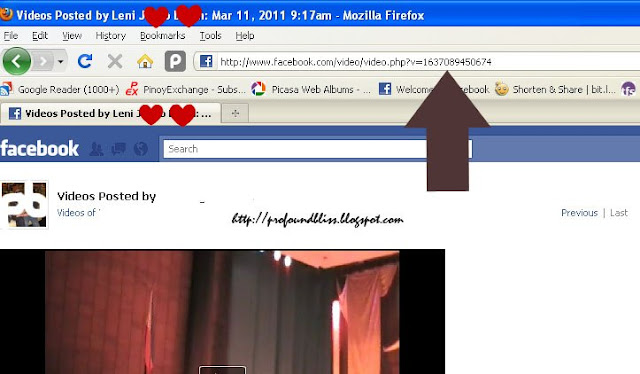
1. Go to the Facebook video page that you want to use
2. Find the video ID at the address bar like the one the arrow is pointing at in the picture below

3. Use the code below to embed the video in your blog:

<object width="400" height="224" >
<param name="allowfullscreen" value="true" />
<param name="allowscriptaccess" value="always" />
<param name="movie" value="http://www.facebook.com/v/xxx" />
<embed src="http://www.facebook.com/v/xxx" type="application/x-shockwave-flash"
   allowscriptaccess="always" allowfullscreen="true" width="400" height="224">
</embed>
</object>

4. Replace "xxx" (there are two, in red fonts) with the video ID found at the address bar.

That's how simple it is to embed a Facebook video on your site or blog.

Had I known this a couple of months ago, it could have made my virtual life a lot easier.

via labnol.org

Just Got Hit By "XP Total Security 2011"

0 comments

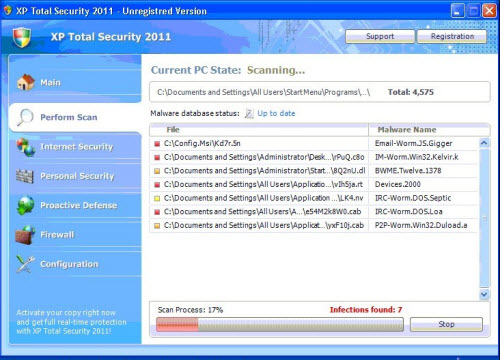
One of my PCs just got infected with the XP Total Security 2011 virus. It's actually a fake virus removal tool that has a similar look with Total XP Security. When I first saw it pop up, it instantly scanned my hard drive and warned me of a number of infected files. It then prompted me to delete the infected files and when I clicked "Yes" another message told me that I had to register first. At that point, I sensed something was wrong.

Forgot to take a screen cap but this is what the fake anti-virus program looks like (via teesupport.com)

A few minutes later, my Firefox malfunctioned and wouldn't connect to any site. A message told me the sites I was trying to access were dangerous. Gah! Since when has Google.com became dangerous?

I then used another PC to Google "XP Total Security 2011" and learned about its hazards. Virus Removal Guru says XP Total Security 2011 (sometimes XPTotalSecurity 2011) blocks applications and creates a series of pop ups and warnings in order to scare the user to purchase the fake program. It further says that the executable file is a series of random letters, so I went back to the infected PC and opened Task Manager. Good thing it had not yet infected msconfig. I searched through the series of processes and found the suspicious 555.exe. I ended the process but it would come back after every few minutes.

There's a downloadable application on Virus Removal Guru's website but I first tried doing what I thought was best. I opened the Registry Editor and searched for "XP Total Security." There wasn't any entry with that name so I tried the executable file "555.exe." Alas it showed a series of entries and I deleted them all. When no more 555.exe was found, I restarted the PC to safe mode. I searched 555.exe again and found one remaining entry to delete.

Good thing XP Total Security 2011 was gone when I turned on the PC in normal mode again.

It's quite interesting that XP Total Security 2011 changes its name to Vista Total Security 2011 or Win7 Total Security 2011 depending on the OS of the PC it infects.

For more info regarding the virus, head over here.

PLDT MyDSL Restored After Three Days

0 comments

Without warning, I lost my internet connection last Thursday afternoon, around 2 PM. I thought it was just a minor trouble like what always happens with PLDT MyDSL. But just the same, I called their technical hotline (172) to report the trouble. I was told by the tech support representative that he would forward it to their technical team immediately.

Around 4 PM, I still didn't have internet connection. I called the hotline again only to be told that the trouble was traced from a "network trouble" in Pasig and majority of the south area accounts were affected.

I asked around the neighborhood but it seemed that I was the only one without internet connection. I know for a fact, though, that in my area, my PLDT MyDSL connection is the only one in the Legacy platform since I subscribed for the service way back 2004 pa. I actually started being on IP-DSLAM then was moved to the Legacy platform when I requested. They eventually created another platform, NGN, where new accounts are accommodated.

So that's why all my neighbors are on the NGN platform and they had internet connection while I was suffering and constantly calling 172 for follow-ups.

The following day (Friday), I searched the net for postpaid plans of Wi-Tribe and Smart Broadband using my Globe Tattoo prepaid (how ironic). I actually sent an application form online to the two said net providers and a pop-up promised that an agent will call me within 24 hours (unfortunately, none among the two has contacted me yet).

While waiting for the call, my itchy feet brought me to SM Bicutan, and my curiosity brought me inside The Sunshop. Since they require nothing but an ID and a payment, I immediately subscribed to their 799 unlimited broadband internet plan, shelling out an initial payment of PHP1,687.00 for the modem and bond of a month's fee.

It was funny, though, that before I paid for it, the customer rep told me it has an activation period of 24 hours. Then after I paid and while the rep was installing the software on my netbook, he changed that statement to 24-48 hours.

It was okay, though, since I was positive that my PLDT connection would be restored that night or Saturday morning.

But of course, knowing PLDT and their "network troubles," I woke up the following day still with no internet. So I inserted Sun's dongle (or modem as they call it) in my laptop but actually not hoping that it's already activated. And, of course, it still wasn't.

Purchased the package 6:05 PM Friday. Come 6:10 PM Saturday, I was already talking to a CSR on their hotline. According to the CSR, I already have a profile in their system but activation request was still not sent by the Bicutan branch. So she made an e-mail to the branch while all I had to do was (helplessly) wait. And I was feeling really helpless and kawawa because I still had no PLDT connection by that time.

Sunday, I had to go to the cemetery and stuff, afterwhich, I headed to SM Bicutan to notify The Sunshop that my subscription was still not activated. I dropped by Prestige first to have a watch battery replaced, and while waiting, I turned on my netbook and inserted the Sun dongle. Lo and behold! It's already activated! So I didn't go to The Sunshop anymore.

I arrived home hoping PLDT was already restored. But it still wasn't.

I normally attend the 8-9 PM mass but since I wasn't busy, I decided to attend the 5-6 PM mass, actually hoping that the Lord only wanted me to go to church first before restoring my PLDT connection.

It was actually a very enlightening mass cuz the priest's voice was clear and malumanay and his homily was heartfelt (I just knew). Then after the mass I did what I had been planning to do for the longest time. I went to the choir side and asked if they're still open for members.

A young man with longish hair gave me the number of a certain Ate Shirley who wasn't around at that time. Imma call her soon.

And then I really felt so blessed when I arrived home and turned on the PLDT modem. Internet connection was restored! See? The Lord just wanted me to seek Him first.

So now I have two internet subscriptions, make that three if you'll count the Globe Tattoo prepaid in. I just wish they wouldn't fail me all at once. My prayer is that they get into a "network trouble" alternately.

Related Posts with Thumbnails